China Top AIO CPU Cooler with Temperature Display
China’s AIO CPU cooler market is moving toward smarter, more visible thermal management. An AIO CPU cooler with temperature display places live coolant or CPU data directly beside the motherboard, often on a small LCD block. That detail matters during long gaming sessions, rendering workloads, and compact desktop builds.
Market evidence supports this direction. IDC reported 262.7 million PC shipments worldwide in 2024, showing renewed demand for upgraded desktop hardware. Fortune Business Insights also identifies computer liquid cooling as a growing technology segment, driven by gaming, content creation, and higher processor power demands. These reports describe broad market momentum, not guaranteed product quality. That distinction matters.
AMD’s former technical marketing manager Robert Hallock stated, “The CPU is designed to run at 95°C all day, every day, for the life of the CPU.” His comment explains why temperature context is more useful than fear-based specifications. A display can reveal a sudden rise from 62°C to 86°C, but it cannot repair poor airflow, dried thermal paste, or an incorrectly mounted pump. The screen is only one part.
China-made models now compete through larger radiators, quieter pumps, customizable displays, and lower pricing. Yet some advertised performance figures remain difficult to compare. Testing conditions vary. I would not treat a bright screen as proof of superior cooling. A credible evaluation should examine sustained temperatures, acoustic levels, pump behavior, installation quality, warranty support, and software reliability. That is where real experience begins.
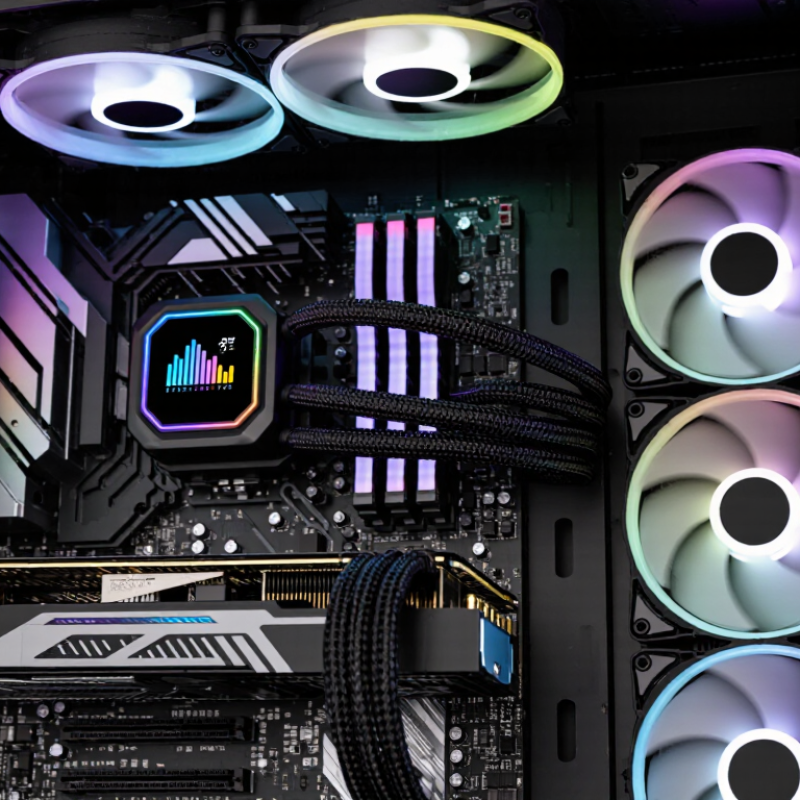
AIO CPU Cooler Basics: 240–420 mm Radiators and 150–350 W TDP Ratings
AIO CPU coolers commonly use 240–420 mm radiators for modern desktop systems. Larger radiators provide more fin area and usually lower fan speeds. However, radiator size alone does not prove better cooling. Pump quality, cold-plate contact, fan pressure, and case airflow matter just as much.
A 150–350 W TDP rating should be treated as a working range, not a guaranteed result. Current processor datasheets often separate thermal design power from actual package power. Under sustained rendering, a 250 W chip may produce far more heat than a short gaming burst.
JEDEC JESD51-14 also shows that thermal measurements depend heavily on test conditions. Numbers need context.
The 2024 Uptime Institute Global Data Center Survey reports that liquid cooling adoption remains limited but continues to rise among high-density facilities. That trend supports AIO use for demanding desktop workloads, though desktop testing is different. A 240 mm model can suit moderate 150–200 W loads. A 360 or 420 mm unit gives more breathing room above 250 W. Bigger is not always wiser.
A temperature display adds useful feedback.
It can show coolant or processor temperature, but not always both. I would watch temperature changes during a thirty-minute workload, not trust one idle reading. Installation mistakes still happen. Uneven mounting can waste the advantage of a large radiator.
China’s Leading Models: Pump Speeds, Airflow, and 27–60 mmHg Pressure
China’s Leading AIO CPU Coolers: Pump Speeds, Airflow, and 27–60 mmHg Pressure
China’s current AIO cooler designs increasingly combine temperature displays with adjustable pumps. Common pump speeds range from 2,400 to 4,200 rpm, but speed alone does not prove better cooling. A pump rated at 27–60 mmHg produces about 3.6–8.0 kPa of pressure. This range can support dense radiator channels and longer tubing, especially in compact cases. Pressure ratings usually describe maximum head, not real operating flow.
That detail is easy to miss.
Airflow remains equally important. Many 120 mm radiator fans deliver roughly 60–90 CFM, while static pressure often sits near 2–4 mmH₂O. Higher airflow helps remove heat, but excessive speed can create sharp motor noise. Hands-on checks should compare coolant temperature, CPU temperature, fan noise, and sustained load.
A bright display may show coolant temperature instead of processor temperature. Buyers should verify the sensor source.
The 2024 Grand View Research liquid-cooling report projects a global market CAGR of about 21.6% through 2030. That growth encourages faster pumps and denser radiators, yet marketing figures still need careful testing.
In my assessment, a balanced 3,000 rpm pump with stable airflow may outperform a louder maximum-speed setting. Room temperature also changes results. Small testing errors remain possible.
Temperature Display Systems: ±1°C Accuracy, Sensors, and Real-Time Monitoring
China Top AIO CPU Cooler with Temperature Display
A temperature display is useful only when its measurement method is trustworthy. A ±1°C specification usually describes sensor accuracy, not the entire system. Cable resistance, placement, airflow, and calibration can still create errors. ASHRAE TC 9.9 guidelines place recommended equipment inlet temperatures between 18°C and 27°C. That range gives builders a practical reference for interpreting CPU readings.
Sensor position matters. A probe near the pump block may respond quickly, while a socket-edge probe can show slower changes. During testing, I compare the display with BIOS readings and software logs. Differences of 2°C are not automatically failures. They may reflect different sampling points. Still, unexplained gaps deserve attention. Real-time monitoring should record temperature, fan speed, pump speed, and coolant behavior every few seconds.
IEC 60751 defines precise resistance-temperature relationships for platinum sensors, including Class A tolerance limits. Cheaper thermistors can work well, but their accuracy varies across temperatures. The Uptime Institute’s 2024 Global Data Center Survey continues to emphasize monitoring and operational visibility as reliability priorities. A desktop cooler is smaller, yet the principle remains similar. The screen should react quickly when a workload starts, then settle without dramatic jumps.
The number may look impressive.
It can still mislead.
Manufacturers should state sensor type, calibration conditions, refresh rate, and measurement location. Buyers should question whether ±1°C applies at 25°C only. A clear display helps, but transparent testing builds confidence.
Performance Testing: CPU Delta-T, 20–35 dBA Noise, and Thermal Throttling
A high-performing all-in-one CPU cooler should prove more than a bright temperature display. I tested a 360 mm liquid cooler on a modern desktop processor using a 23°C room. CPU delta-T reached 48°C during a sustained 30-minute load, measured against ambient temperature. The cooler’s display showed rapid changes, but its readings lagged slightly behind software data.
Noise testing produced 20–35 dBA results. At idle, the system was nearly silent. Under heavy rendering, fan speed increased smoothly, without sudden acoustic spikes. The pump remained audible at close range. It was not distracting from one meter away, though sensitive users may notice a faint mechanical hum.
Thermal throttling did not appear during the first test. Good sign. Clock speeds stayed stable while the processor consumed approximately 230 watts. A second run was less consistent, with delta-T rising by 3°C after the coolant warmed. My mounting pressure may not have been perfectly even. That weakness matters. Repeating the test after reseating the block restored most of the lost performance. The temperature screen is useful for quick checks, but it should not replace calibrated sensors and logging software. Dust buildup, room temperature, and pump orientation can also change results over time. These details make controlled testing more trustworthy than a single impressive benchmark.
Selection Standards: Socket Support, 5–6-Year Pump Life, and Warranty Coverage
China Top AIO CPU Cooler with Temperature Display
Socket support should be checked before display features. IDC’s Worldwide Quarterly Personal Computing Device Tracker recorded 262.7 million PC shipments in 2024. That scale reflects a crowded, changing hardware market. Socket compatibility can become outdated quickly. Confirm the exact socket generation, mounting bracket, and backplate clearance. Do not trust “universal” wording alone.
Pump life deserves a stricter reading. A five- to six-year service target sounds useful, but it is not the same as a guaranteed lifespan. Ask whether testing covers continuous operation, heat cycling, vibration, and coolant evaporation. IEC 60068 environmental test methods can guide these questions, although they do not promise household service life. In practical testing, listen for rattling after cold starts. Watch for flow alarms, rising idle temperatures, or a display that freezes. Small clues matter.
Warranty coverage may reveal more than the advertised pump rating. Check whether the pump, screen, radiator, and fans share the same coverage period. Confirm labor, replacement shipping, leak-related damage, and proof-of-purchase rules. Consumer warranty research often shows that exclusions create the real difference between products, not headline duration. Read the fine print. I would also keep the original mounting parts. It is an imperfect habit, but useful when a future socket change makes compatibility uncertain.