


10 Tips for Choosing the Best Auto Phone Holder
Choosing an Auto Phone Holder can seem like a small purchase. Yet a loose mount may wobble over a pothole, block an air vent, or leave the screen hard to see. Those details matter when a navigation prompt arrives near a turn. A good fit should keep the phone steady and readable without encouraging constant handling. Simple goal. Not always simple choice.
The safety stakes are real, though a holder alone cannot make driving distraction-free. The U.S. National Highway Traffic Safety Administration reported 3,275 deaths in distraction-affected crashes in 2023. That figure covers many forms of distraction, not phone mounts alone. Driving-distraction researcher Dr. David Strayer has put the attention problem plainly: “The brain is not capable of doing two things at once.” His work is a useful reminder: even a well-positioned screen can draw attention away from the road.
These tips examine the practical details buyers can test: dashboard, vent, windshield, or cup-holder placement; grip strength; viewing angle; vibration; phone and case compatibility; and charging access. A mount that works in one car may sit poorly in another. That is easy to overlook. Consider the driver’s reach, the screen’s visibility, and whether installation stays secure after daily use. No product removes every trade-off. The best choice is the one that fits your vehicle, keeps the phone stable, and supports brief, hands-free glances rather than fiddling on the move.
Types of Auto Phone Holders and How They Attach
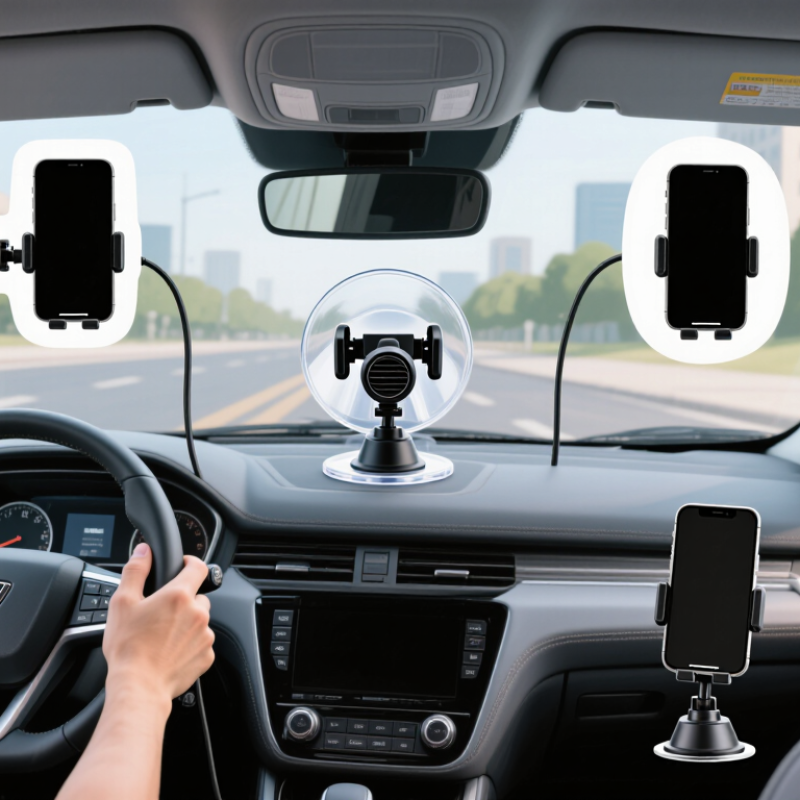
Auto phone holders differ mainly in where they sit and how they attach. Vent mounts use a clip or hook on an air vent. They are quick to install, but a heavy phone may make a thin vent feel loose. Cold air can also blow directly onto the device. Small detail, big annoyance. Dashboard and windshield holders usually use a suction cup; some add a sticky base for textured surfaces. They offer flexible positioning, though dust or heat can weaken the grip over time.
Other designs fit into a cup holder or attach to a CD slot. A cup-holder mount keeps the windshield clear, but its height may interfere with nearby controls. CD-slot mounts can feel stable, yet they are unsuitable if you use the slot.
Check the attachment before buying. A suction cup needs a smooth, clean area, while an adhesive base may not bond well to soft or textured dashboards. Test the reach from your normal driving position, with the phone installed. Can you glance at it without leaning? Also check that the mount does not block vents, buttons, or your view of the road. A holder that works without a phone case may wobble once the case is on. Fit matters more than appearance. No mount is perfect; the best choice depends on your vehicle’s layout and the surfaces available.

Check Vehicle Compatibility and Available Mounting Locations
A phone holder can fit the dashboard and still be wrong for your car. Check your vehicle’s layout before comparing mount styles. Look for a flat, stable surface that stays within easy reach without blocking your view of the road. Keep clear of airbag panels, indicator lights, and essential controls. A holder near a steering wheel may seem convenient, but it should never interfere with steering or visibility.
Tip: Sit in the driver’s seat and test possible locations with the car parked. Check whether the screen remains readable in daylight and whether your hand can reach it without stretching. Measure before buying. Dashboard curves, textured finishes, and deep vents can make some mounts unstable. That matters.
Check the vehicle manual for guidance around airbags and dashboard equipment. For a vent mount, inspect the vent slats; thin or angled slats may not support a heavy phone securely. A windshield mount may suit some vehicles, while others have little clear glass space. Also consider charging cables: a cable that crosses the gear selector or steering area can get in the way. I once overlooked the cable path, and the placement felt fine until I tried shifting. Recheck the fit with your phone and case attached.
Assess Grip Strength, Stability, and Phone Protection
A secure auto phone holder should grip firmly without squeezing buttons or scraping the phone’s edges. Check that its arms close evenly and that the contact points have soft, clean padding. A mount that feels sturdy in your hand can still loosen on a rough road. Test the fit with your phone case attached; thick or slippery cases can change how well the holder grips.
Tip: Install and adjust it while parked. Give the phone a gentle push from each side. It should stay in place without wobbling or triggering the screen. If the holder attaches to a vent, check that the clip fits the vent slats securely. Adhesive mounts also need a clean, flat surface and enough time to set. Small details matter.
Stability depends on more than grip. A long, flexible arm may bounce over potholes, while a shorter support often keeps the screen steadier. Check that the joint locks firmly and does not sag after you position it. The holder should let you see the display without blocking your view of the road. Padding helps protect the phone, but grit trapped beneath it can still leave marks. I’ve found that a quick wipe before mounting is easy to forget—and worth doing.
10 Tips for Choosing the Best Auto Phone Holder
Compare grip strength, stability, phone protection, and other practical selection criteria. Scores are illustrative ratings on a 1–5 scale, not laboratory test results.
Compare Adjustability, Visibility, and Ease of Use
Tip 1 Test adjustability before buying. A good holder should tilt toward the driver, rotate between portrait and landscape, and stay firm over bumps. Check that its joints lock securely; a loose hinge can slowly dip during a trip.
Tip 2 Judge visibility from your normal driving position. The screen should be easy to glance at without blocking the road, dashboard controls, or vents. NHTSA reported 3,308 deaths in distraction-affected crashes in 2022. That figure covers many forms of distraction, not phone holders alone, but it underlines why a clear view matters. Keep the display within a quick glance, not directly in your sightline.
Tip 3 Prioritize one-handed use. Place your phone in and remove it while parked, then check whether the clamp covers side buttons or makes charging awkward. A magnetic mount may feel faster, while a spring clamp can grip a wider range of cases. Neither is automatically better. Try your phone with its usual case, and test the holder on your actual dashboard or vent; a mount that works in a shop may wobble in your car.
Tip 4 Check stability and daily comfort together. Look for a base that resists sliding and an arm that does not vibrate on rough pavement. Small details count. A holder can be adjustable yet irritating if it needs constant repositioning. If possible, test its reach while parked before committing.
Review Installation, Materials, and Long-Term Care
A phone holder should keep the screen visible without blocking the road or controls. Before buying, check that its mount fits your dashboard, vent, or windshield and can support your phone with its case on. Install it while parked, then adjust the viewing angle from your normal driving position. The mount should not wobble over bumps or require a reach across the cabin. Small details matter.
Materials affect grip and wear. Look for a firm clamp, smooth contact pads, and a mount that does not feel brittle or flex under light pressure. NHTSA reported 3,308 deaths in distraction-affected crashes in 2022; a holder cannot prevent distraction, but a stable position may reduce fumbling. Keep setup simple, and set navigation before moving. I would still recheck the angle after changing vehicles; a mount that works in one car may sit awkwardly in another.
Tips:
Wipe dust from suction cups and vent clips with a soft, damp cloth. Avoid harsh cleaners, which may damage rubber or plastic. Check the clamp and joints monthly, especially after hot weather. If the holder slips, loosens, or leaves residue, clean the surface and reinstall it according to its instructions. Replace worn pads rather than tightening the mount until it strains.
Article Source:

Whether your solution requires a single pumping application or an expansive engineered system,
CheckPoint is committed to becoming your partner in excellence.


