



What Is a 360 Degree Swivel Stand and How Does It Work?
A 360 degree swivel stand is a practical mounting solution that allows an attached screen, camera, tablet, or display to rotate smoothly around a central axis. It can improve viewing comfort in homes, offices, studios, classrooms, and retail spaces. Instead of lifting the device repeatedly, users can turn it with controlled pressure. This small movement can make a noticeable difference.
Most swivel stands combine a stable base, a rotating joint, and a mounting surface. Some models use ball bearings, while others rely on friction plates or adjustable hinges. The joint controls movement and helps the device remain in position. A quality design should rotate evenly, resist unwanted wobbling, and support the product’s stated weight. The base also needs enough contact with the desk or floor. A wide base usually feels safer.
Installation is often simple, but assumptions can cause problems. A stand may fit the device yet fail on a weak desk or uneven surface. Users should check dimensions, mounting patterns, weight limits, and cable clearance before choosing one. Rotation can also twist cables over time. That detail is easy to overlook. In this guide, we will examine how a 360 degree swivel stand works, where its flexibility helps, and which design features deserve careful attention. Real performance depends on construction, not marketing language alone. Some stands feel smooth at first, then loosen later. That possibility deserves honest consideration.
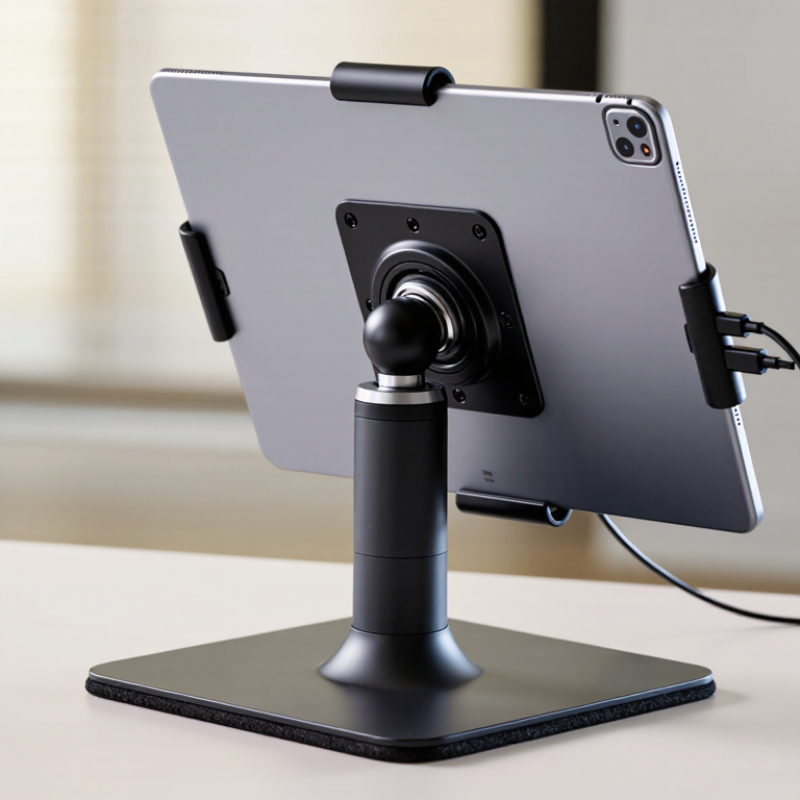
Definition and Main Purpose of a 360-Degree Swivel Stand
What Is a 360 Degree Swivel Stand and How Does It Work?
A 360-degree swivel stand is a support platform that rotates fully around a central axis. Its main purpose is to improve access, viewing, or positioning without lifting the supported object. A base holds the stand steady, while a bearing or rotating plate allows smooth movement. Some models also include a locking mechanism for fixed positioning.
In practical use, the stand can turn an item toward a person, camera, or work area. This is useful for product displays, small equipment, monitors, and workshop tasks. The rotation may feel smooth or slightly resistant, depending on the bearing quality, load, and surface condition. I have found that uneven tables can make a stable stand seem faulty. That detail is easy to overlook. The stated weight capacity should always exceed the object’s actual weight.
Tips: Place the stand on a level, firm surface. Keep the load centered. Turn it slowly at first. Check for wobbling, unusual noise, or loose hardware. A locking feature is valuable when repeated movement is unnecessary. However, smooth rotation is not always better. Excessive looseness can reduce control, especially with tall or uneven objects. Regular inspection helps, though inspection alone cannot correct poor installation or an unsuitable load.

What Is a 360-Degree Swivel Stand and How Does It Work?
A 360-degree swivel stand is a support platform that rotates around a vertical axis. A rotating plate, bearing, or turntable mechanism allows the mounted object to be viewed or positioned from every direction.
Key purpose: A full 360-degree swivel stand provides one complete revolution, making it useful when an object needs adjustable orientation without moving the base.
Core Components That Enable Full-Rotation Movement
A 360-degree swivel stand allows an attached object to rotate around a central vertical axis. Its movement depends on several coordinated parts, not the visible platform alone. The base spreads the load across the mounting surface, while a spindle or central shaft keeps rotation aligned.
Around this shaft, a bearing assembly reduces contact friction. Ball bearings suit smooth, repeated movement, while plain bushings can be quieter and simpler. The choice affects feel, noise, and service life.
A rotating plate transfers weight to the bearing through a race, washer, or reinforced shoulder. These surfaces must remain level, because slight misalignment can create drag or uneven wear. Fasteners hold the assembly together, and spacers preserve the correct gap between moving parts.
Many stands also include a lock pin, friction knob, or indexed stop. These controls prevent unwanted rotation during use.
In practical checks, I look for wobble, rough spots, loose screws, and scraping sounds. Small debris can matter. Lubrication may help, but excess lubricant can attract dust and hide damage.
The rated load should include the stand, attached equipment, and movement forces. That calculation is often underestimated. A swivel can turn freely while remaining unsafe if its center of gravity sits too far from the shaft.
Materials matter too: hardened steel supports heavy cycles, while engineered polymers can reduce noise and weight. No design is perfect. Regular inspection remains necessary after frequent rotation or accidental impacts.
How a 360-Degree Swivel Stand Works Step by Step
What Is a 360 Degree Swivel Stand and How Does It Work?
How a 360-Degree Swivel Stand Works Step by Step
A 360-degree swivel stand lets an object rotate horizontally around a fixed center point. It may hold a display, monitor, camera, or small equipment. The stand usually contains a stable base, a rotating plate, and a bearing assembly between them. Smooth movement matters.
The process begins when the base stays firmly on a table or mounting surface. The bearing supports the upper plate while reducing friction between moving parts. When you apply gentle pressure, the upper plate turns around its central axis. Some models use ball bearings, while others use layered discs with low-friction surfaces. A locking screw or detent may stop the platform at a chosen angle. Cable openings can also prevent wires from twisting during rotation. In practical use, the stand should turn evenly without wobbling, grinding, or sudden resistance.
Tips: Place the heaviest item near the center. Check the stated load capacity before use. Keep the bearing area clean and dry. If rotation feels rough, inspect for dust, loose screws, or uneven weight. A level surface improves stability, although it does not fix a poorly aligned mechanism. Do not force the platform past its intended range. Some stands appear fully continuous but include internal stops. That detail is easy to overlook. Clearance also deserves attention, especially when nearby objects could block the turn.
What Is a 360 Degree Swivel Stand and How Does It Work? - How a 360-Degree Swivel Stand Works Step by Step
| Step | Stand Component or Action | How It Works | Key Data or Practical Detail | Result |
|---|---|---|---|---|
| 1 | Base Placement | The stand is placed on a stable, level surface. A wide base distributes the supported load and helps reduce tipping during rotation. | Stability depends on the base footprint, total load, center of gravity, and surface friction. | The stand remains supported while the mounted object is turned. |
| 2 | Load Attachment | The object is secured to a platform, clamp, bracket, or mounting plate. Fasteners or gripping surfaces keep the load connected to the rotating section. | The mounting method should match the object's weight, shape, and balance. The load should be centered whenever possible. | The object and rotating platform act as one assembly. |
| 3 | Bearing or Swivel Interface | A rotary interface separates the stationary base from the rotating platform. Ball bearings, roller bearings, or a low-friction swivel joint allow relative movement. | Bearing quality affects smoothness, friction, noise, service life, and permissible load. | The platform can rotate without the entire base moving. |
| 4 | Rotation Input | The user applies a turning force by hand, or an integrated drive supplies torque through a motor and transmission system. | Manual models rely on applied hand force; powered models require a motor, controller, and suitable power supply. | Torque is transferred to the rotating platform. |
| 5 | 360-Degree Movement | The swivel interface permits continuous or near-continuous rotation around a vertical axis, depending on the design and cable arrangement. | A full revolution equals 360 degrees. Some stands use stops to limit rotation for safety or positioning. | The mounted object can face different directions without being lifted or repositioned. |
| 6 | Friction and Resistance | Contact surfaces, bearing seals, lubricant, and load pressure create resistance that controls how easily the platform turns. | Higher friction can improve holding stability, while lower friction enables smoother movement and easier adjustment. | Rotation feels controlled rather than excessively loose or difficult. |
| 7 | Positioning and Holding | The platform is rotated to the desired angle and held by friction, a locking screw, detent positions, or a mechanical brake. | Locking systems are useful when the object must remain fixed during viewing, adjustment, display, or operation. | The object stays aligned at the selected viewing or working angle. |
| 8 | Cable and Hose Management | If the mounted object uses cables, hoses, or power connections, the swivel design must provide clearance or use a rotary connection. | Unmanaged cables can twist, restrict rotation, create tripping hazards, or become damaged during repeated turns. | Rotation remains practical without pulling or tangling connected lines. |
| 9 | Load and Balance Check | The stand is evaluated for vertical load, off-center force, overturning moment, and repeated-use conditions. | Actual capacity varies by construction, bearing type, mounting method, and load distribution; the stated working limit should not be exceeded. | The stand operates within its intended mechanical limits. |
| 10 | Routine Maintenance | The swivel area is inspected for looseness, wear, contamination, corrosion, and abnormal noise. Fasteners are checked and moving parts are serviced as specified. | Inspection frequency should increase with heavy loads, outdoor exposure, frequent rotation, or dusty working conditions. | Smooth operation, reliable positioning, and longer service life are supported. |
Common Stand Types and Their Practical Applications
A 360-degree swivel stand lets an object rotate horizontally around a fixed base. Its central shaft, bearing, and locking mechanism control movement. Some models turn freely, while others stop at set angles. Cable channels can keep wires from twisting during repeated rotation. The small detail matters.
Common stand types serve different environments. A weighted desktop stand suits monitors, tablets, and product demonstrations. A clamp-on stand saves desk space but needs a strong edge. Pole-mounted versions support several screens or cameras in control rooms. Turntable bases work well for retail displays, inspection benches, and photography. Wall-mounted swivel arms provide viewing flexibility in classrooms or reception areas.
Grand View Research’s 2024 ergonomic office furniture analysis forecasts market growth of roughly 6% annually through 2030. That trend reflects demand for adjustable workstations, not merely attractive accessories. Another industry analysis, MarketsandMarkets’ workplace furniture research, identifies modular and flexible layouts as continuing priorities. In practice, a stand should match the object’s weight, center of gravity, and viewing distance. A smooth turn is not enough. Poorly balanced equipment may wobble, scrape the desk, or slowly rotate away from the user. I have found that friction adjustment is often overlooked. Manufacturers publish load ratings, but real setups can behave differently after adding adapters, cables, or protective cases. Testing the fully assembled stand is wiser than trusting the empty specification sheet.
Key Factors for Choosing a Suitable Swivel Stand
A 360-degree swivel stand is a support base that lets a screen, tablet, or small display rotate around a central axis. Its bearing or rotating plate provides smooth movement. Some models also offer height adjustment, tilt control, or cable channels. This design helps users change viewing angles without lifting the equipment. It is useful in meeting rooms, reception desks, training areas, and compact workstations.
Choosing a suitable swivel stand requires more than checking its appearance. Confirm the equipment’s weight, mounting pattern, and center of gravity. A weak bearing may wobble when the screen turns. Check the VESA pattern when supporting a monitor. The base should also fit the desk without blocking keyboards or cables. OSHA workstation guidance recommends placing screens near eye level and reducing awkward neck positions. This makes rotation valuable, but only when adjustment remains stable. Grand View Research valued the global office furniture market at approximately USD 63.3 billion in 2022. Its report also identified workspace flexibility as an important market direction. The figure is broad, not specific to swivel stands, so it should not guide purchasing alone.
Tips: Test the stand with the actual device. Turn it slowly and watch for friction, noise, or cable twisting. Choose a metal base for heavier equipment. Add rubber feet on smooth desks. A locking mechanism can prevent unwanted movement. Do not ignore cleaning access. Dust around the rotating joint may affect performance over time. Some specifications look impressive, yet real stability can still disappoint.
Article Source:

Whether your solution requires a single pumping application or an expansive engineered system,
CheckPoint is committed to becoming your partner in excellence.


