



How to Choose the Best Finger Scan Door Lock in China?
Choosing a Finger Scan Door Lock in China involves more than comparing sleek designs or advertised recognition speeds. A lock must fit the door, the household’s routines, and the conditions around the entrance. A fingerprint reader near a humid doorway may need more frequent cleaning. Dust, damp fingers, worn fingerprints, or small cuts can also affect everyday use. Real homes are less predictable than product demonstrations.
Start by checking door thickness, opening direction, and lock-body compatibility. Ask the seller for installation requirements before ordering, especially if the door has an unusual frame or existing lock. Then examine practical features: a responsive sensor, clear low-battery warnings, emergency power access, and a dependable backup entry method. Test these details where possible. A smooth scan is useful, but it does not prove the whole lock is secure.
Pay attention to who makes the product and who will support it after installation. Review warranty terms, replacement-part availability, privacy settings, and how the lock handles user data. Do not rely on a single security label or a bold claim in an online listing; verify specifications with the manufacturer or installer. The cheapest option may be costly later. So can an elegant one. This guide explains how to compare available models in China and match their features to real needs. Some trade-offs are easy to miss, and no fingerprint system works perfectly for every person. A careful choice begins with honest expectations.
Understanding Fingerprint Door Lock Types and China’s Market
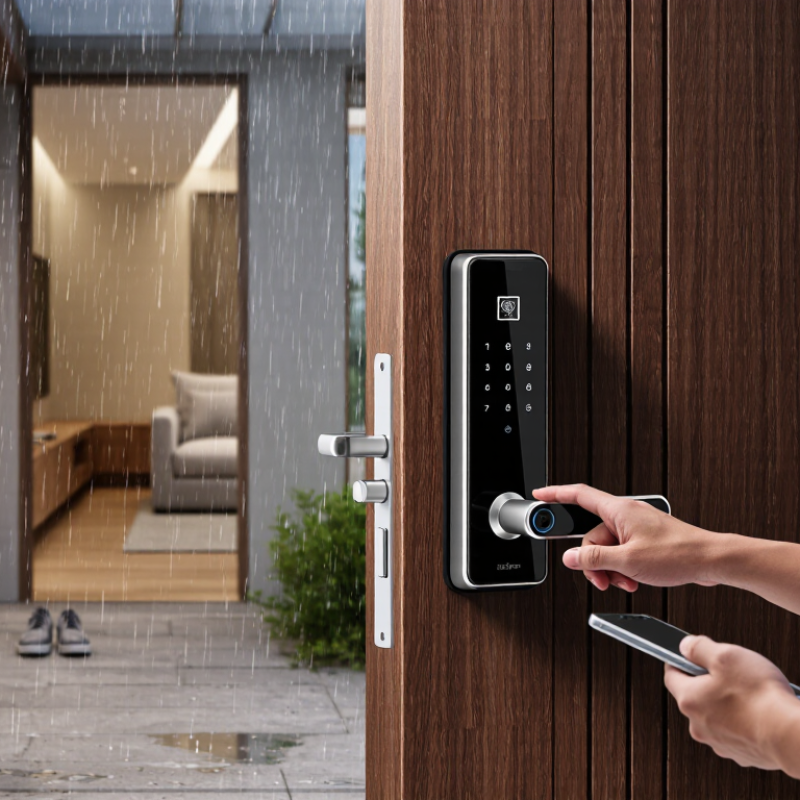
Fingerprint door locks in China generally fall into three groups: biometric-only models, connected smart locks, and hybrid locks with a mechanical key or keypad backup. Connected models may add app alerts, temporary access codes, and remote control. The best fit depends on the door, not just the feature list. Check its thickness, opening direction, and lock-body dimensions before choosing; Chinese doors can use different fittings and mortise standards.
China’s market is shaped by dense apartment living, retrofit demand, and strong smart-home connectivity. Grand View Research valued the global smart lock market at US$2.9 billion in 2023 and forecast 19.6% annual growth through 2030. This is a global estimate, not a China-only figure, but it signals rising interest in connected access. For a practical comparison, assess fingerprint recognition, liveness detection, encrypted data handling, and what happens during a power or network outage. One detail is easy to overlook: an impressive sensor still needs dependable installation and a usable backup method.
Tips: Measure the door and confirm lock compatibility before ordering. Ask whether fingerprints are stored locally, and test the backup opening method. A small mismatch can mean a costly refit. My own preference is a lock that works offline, though remote alerts can be useful.

Defining Your Security, Access, and Household Requirements
How to Choose the Best Finger Scan Door Lock in China?
Defining Your Security, Access, and Household Requirements
Start with the door you actually have. Measure its thickness, check the lock body, and confirm whether the door opens inward or outward. A fingerprint lock must fit the door and its existing hardware; appearance alone is not enough. In humid coastal areas, moisture resistance may matter, while dusty locations can call for careful maintenance. Ask an experienced installer to check compatibility before purchase. Small details count.
Then map out who will use the lock each day. A family with children or older adults may need a keypad or key backup if fingerprints are hard to read. Consider whether household members need separate access records, and how you will remove access when a guest or helper no longer needs it. Remote features can be useful, but they should not be essential if your internet connection is unreliable. I would not assume one unlocking method suits everyone. Real homes are messier than product pages suggest.
Tips: Test several fingers during setup, and keep a permitted backup method available. Ask about local installation, battery alerts, emergency power, and warranty service. Read the access settings carefully; convenience can become a small security gap if codes are shared casually.
Comparing Fingerprint Sensors and Backup Entry Methods
In China, compare fingerprint sensors by how they handle real fingers, not just advertised speed. Capacitive sensors read ridge patterns through electrical changes; optical sensors capture an image. Either can struggle with damp, dusty, very dry, or worn fingertips. Ask whether the lock allows several enrolled fingers and gives a clear rejection prompt. Test it with cold hands and after washing them. Small details matter.
NIST’s SP 800-63B digital identity guidance sets a false-match-rate benchmark of 1 in 1,000 for biometric systems and calls for testing false rejections. That guidance is not a certification of household door locks, but it offers a useful performance reference. Still, numbers do not show how a lock behaves in your doorway. Keep a backup route: a mechanical key, a PIN keypad, or emergency power access. Check where the key cylinder sits and whether the power contacts are reachable from outside. A PIN helps when a finger is cut or wet, but exposed keypads can reveal worn digits. I would test every fallback before installation, not during a power failure. The weak point is often the backup.
| Entry Method or Feature | How It Works | Practical Advantages | Limitations to Consider | What to Check Before Buying |
|---|---|---|---|---|
| Capacitive fingerprint sensor | Reads patterns in the ridges and valleys of a finger using changes in electrical capacitance. | Convenient key-free access; the sensor can be compact and integrated into a handle or lock panel. | Recognition may be affected by very wet, dirty, worn, or damaged fingers. Performance differs by sensor and lock design. | Check enrollment capacity, response in the intended location, and whether the sensor is protected from rain and direct exposure. |
| Optical fingerprint sensor | Captures an image of the fingerprint, typically using light and an image sensor. | Uses an established fingerprint-imaging approach and can provide a visible sensing surface. | Image quality can be affected by dirt, moisture, lighting, or a damaged finger; implementation varies between locks. | Ask how the sensor performs in the lock’s installation environment and whether the manufacturer provides clear cleaning and care guidance. |
| PIN code | Unlocks the door after the user enters a stored numeric code on a keypad. | Useful when a fingerprint cannot be read and for temporary access if the lock supports separate or changeable codes. | Codes can be observed, shared, or guessed if they are weak or reused. Keypad usability may vary in poor lighting. | Look for code management, incorrect-entry lockout settings, and a keypad that is easy to use without revealing the code. |
| Mechanical key | Operates a physical cylinder independently of fingerprint recognition, where a key override is provided. | Can provide an alternative if the electronic controls or batteries fail. | Not every model includes a key cylinder; keys can be lost, copied, or difficult to access during an emergency. | Confirm that a physical key override is included, where the keyhole is located, and how spare keys should be stored securely. |
| IC card or proximity card | Unlocks the door when a registered card or token is presented to the reader. | Simple for users who prefer not to enter a code; cards can often be added or removed through lock settings. | A card can be misplaced or shared, and compatibility depends on the lock and card technology. | Check the supported card type, card-management process, and what to do if a registered card is lost. |
| Phone app or Bluetooth | Uses a compatible phone and wireless connection for unlocking or managing access, depending on the model. | May support remote or temporary access features when the lock and its network setup provide them. | Availability can depend on phone battery, connectivity, app support, and account security; Bluetooth alone does not provide internet access. | Check whether remote access requires an additional gateway, which phones are supported, and how access works during an internet outage. |
| Emergency external power | Supplies temporary power to a lock with depleted internal batteries through a supported external power port. | Can help power the lock long enough to use an authorized unlocking method. | It supplies power; it is not itself an unlocking credential. The port and supported power source vary by model. | Confirm the port type, recommended power source, location of the port, and which credential is still required after power is supplied. |
Selection tip: Compare sensor reliability, weather suitability, and at least one practical backup entry method. Features and performance vary by model, so verify the lock’s specifications and installation requirements before purchase.
Checking Safety Standards, Privacy, Installation, and Support
When comparing finger scan door locks in China, ask for current test and conformity documents covering both electronic and mechanical parts. Check how the lock handles repeated failed scans, low batteries, and emergency power loss. A product page is not evidence. Request documents you can verify, and confirm they apply to the exact model you plan to buy.
Privacy deserves equal attention. Ask whether fingerprint templates stay on the lock or are sent to a cloud service, and how users can remove stored data. Check who can view entry records and whether an internet connection is required for everyday use. A polished app screen is not proof of good security. Also inspect the keypad: fingerprints or worn buttons may reveal frequently used codes.
Installation can make a reliable lock frustrating. Measure your door thickness, existing mortise, and opening direction before ordering; a few millimetres can matter. Have the installer test the latch with the door both open and closed. Listen for scraping. Ask about warranty coverage, firmware updates, replacement parts, and local repair response times. Keep emergency access in mind. I would not assume every door is compatible, even when a listing says “easy fit.”
Shortlisting Models by Budget and Verifying Product Claims
Start with the door. A low-cost fingerprint lock may suit a sheltered apartment entrance, while a midrange model can add a keypad, backup key, and clearer access logs. Spend more only when you need features such as remote alerts or multiple user profiles. In China, check the lock’s fit against your door thickness, mortise, and opening direction. Humid corridors and dusty hands can also affect daily use. Small details matter.
Treat advertised recognition speed and “high accuracy” as claims to verify, not proof. Ask for test conditions, sample size, and the measured false-match rate. NIST’s SP 800-63B sets a one-in-1,000 false-match benchmark for biometric systems, but it is guidance for digital identity, not a door-lock certification. Do not confuse the two. Test several fingers, including a slightly damp one, and repeat after installation. Check how the lock behaves when its battery runs low and whether the backup method works without an app. I would not trust a polished demo alone; real doors are less cooperative. Ask sellers for the test report and warranty terms in writing.
Article Source:

Whether your solution requires a single pumping application or an expansive engineered system,
CheckPoint is committed to becoming your partner in excellence.


